Showing posts with label you. Show all posts
Showing posts with label you. Show all posts
Thursday, March 9, 2017
All You Need To Know About Gotv Sms Codes And All Commands E t c
All You Need To Know About Gotv Sms Codes And All Commands E t c
By Olatech at Gurufound
What is GOtv?

" Gotv is a pay TV service offered in Africa by Multichoice Africa. Unlike the other pay TV service from Multichoice Africa (DSTV), which is satellite based,Gotv is terrestrial digital TV service. no need for dish and ceremonial installation, leading to reduced access cost. Gotv is currently available in select cities in Nigeria, Zambia, Uganda, Ghana, Malawi, Namibia, Zimbabwe, and Kenya "
Note: With as low as N6,900, you can access Gotv in Nigeria with 38 exciting channels. Cost includes the Gotv decoder, antenna, and 1 month free GOtv plus subscription.
List of GOtv decoder codes and their uses
Gotv Prices
The decoder comes with an outdoor antenna (a.k.a GOtenna), which offers better reception with better quality video and audio.
Initial Gotv access cost is 6,900 Naira for decoder, outdoor antenna, remote, and 1 month free Gotv plus package.
No dish, means that GOtv is not affected by weather easily as the case with pay TV satellite services like DSTV ( learn about Dstv from Prezzys Post )

GOtv Channels & Packages
GOtv offers two pay bouquets, namely the GOtv standard package, which offers 25 channels and goes for N1,000 per month and GOtv Plus package, which has 38 channels is priced at N1,500 monthly.
There is also the GOtv Open which currently offers up to 7 free to air channels free once you pay a one-off non-refundable 6,600 Naira administrative fee.
Some channels available on the GOtv package include:

How to Recharge GOtv GoTV using eTranzact
The eTranzact BankIT solution allows you to pay for your subscription, directly from your bank account, online and on mobile.
To pay on mobile:
How to Recharge GOTV using Paga ePay
You are now able to pay for your GOtv subscription using Paga e-Pay.
To make an online payment for your GOtv subscription using via Paga e-Pay, visit eazy.gotvafrica.com and then log into your account. You will be presented with a list of online payment methods that are available in your country. Select Paga e-Pay and follow the instructions.
GoTv Customer Care Number and other ways to Contact them.

1.) GOtv Customer Care Phone Number 08039044688)
2.) GoTv Customer Care Email Addressnigeria@gotv.co.za)
3.) GoTv Customer Care Social Accounts:
nigeria.gotvafrica.com).
5.) GoTv Customer Service Contact Address: You can also visit their physical address in Nigeria at Plot 1381 Tiamiyu Savage Street Victoria Island Lagos State.
That’s all on how to contact GoTv.
I Hope I covered everything here....Please add more if you think I missed something..thanks
What is GOtv?
" Gotv is a pay TV service offered in Africa by Multichoice Africa. Unlike the other pay TV service from Multichoice Africa (DSTV), which is satellite based,Gotv is terrestrial digital TV service. no need for dish and ceremonial installation, leading to reduced access cost. Gotv is currently available in select cities in Nigeria, Zambia, Uganda, Ghana, Malawi, Namibia, Zimbabwe, and Kenya "
Note: With as low as N6,900, you can access Gotv in Nigeria with 38 exciting channels. Cost includes the Gotv decoder, antenna, and 1 month free GOtv plus subscription.
List of GOtv decoder codes and their uses
Gotv Prices
The decoder comes with an outdoor antenna (a.k.a GOtenna), which offers better reception with better quality video and audio.
Initial Gotv access cost is 6,900 Naira for decoder, outdoor antenna, remote, and 1 month free Gotv plus package.
No dish, means that GOtv is not affected by weather easily as the case with pay TV satellite services like DSTV ( learn about Dstv from Prezzys Post )
GOtv Channels & Packages
GOtv offers two pay bouquets, namely the GOtv standard package, which offers 25 channels and goes for N1,000 per month and GOtv Plus package, which has 38 channels is priced at N1,500 monthly.
There is also the GOtv Open which currently offers up to 7 free to air channels free once you pay a one-off non-refundable 6,600 Naira administrative fee.
Some channels available on the GOtv package include:
- Africa Magic (World, Movies, Yoruba, Hausa)
- Al Jazeera
- BET
- Discovery World
- E! Entertainment
- KidsCo
- Channel O
- Supersport Select Sport
- Sony Max
- Sound City
- Style Network
- Silverbird
- AIT
- NTA
- and so on
- CNN
- Disney Junior
- MTV Base
- Telemundu
- National Geographic Wild
- Sony Entertainment TV
- Supersport Blitz
- Navigate to (Quickteller: buy airtime, make payments, send money and recieve money with your ATM card.) on your computer or mobile phone. Make sure you have Switched On your decoder.
- Select the GoTv bouquet you want to pay for.
- Input your decoder IUC number. It can be found on the red sticker at the back of your decoder.
- Enter your Email address, mobile phone number and click on Next to continue with GoTv subscription payment.
- You will be redirected to a secure billing page, select your debit card type (Visa, Master or Verve) and fill in your card details.
- Finally, click on the Pay button. Your GoTv account will be credited and subscription will be renewed in few minutes. Quickteller charges N100 naira for this transaction.
How to Recharge GOtv GoTV using eTranzact
The eTranzact BankIT solution allows you to pay for your subscription, directly from your bank account, online and on mobile.
To pay on mobile:
- Simply dial *389*9*smartcardnumber# then follow the prompts.
- Select Country, input specific Smart card number and click on VERIFY button.
- Click VIEW BALANCE AND PAY to proceed to the payment summary page showing date and amount due for payment.
- Click PAY to proceed to the Payment Subscription page showing Account Holder’s details.
- Select eTranzact Payment Option and select BankIT.
- Input Bank account number and select preferred Bank.
- Generate a 6-digit passcode and submit details
- Dial *389*00# with phone number registered with the nominated Bank to receive an OTP.
- Input the OTP in the space provided and click PAY.
How to Recharge GOTV using Paga ePay
You are now able to pay for your GOtv subscription using Paga e-Pay.
To make an online payment for your GOtv subscription using via Paga e-Pay, visit eazy.gotvafrica.com and then log into your account. You will be presented with a list of online payment methods that are available in your country. Select Paga e-Pay and follow the instructions.
GoTv Customer Care Number and other ways to Contact them.
1.) GOtv Customer Care Phone Number
08039044688)2.) GoTv Customer Care Email Address
nigeria@gotv.co.za)3.) GoTv Customer Care Social Accounts:
- GoTv Twitter Customer care: (GOtv Nigeria (@GOtvNg) | Twitter).
- GoTv Facebook Customer Contact: (Facebook).
nigeria.gotvafrica.com).5.) GoTv Customer Service Contact Address: You can also visit their physical address in Nigeria at Plot 1381 Tiamiyu Savage Street Victoria Island Lagos State.
That’s all on how to contact GoTv.
I Hope I covered everything here....Please add more if you think I missed something..thanks
Available link for download

Tuesday, March 7, 2017
Do you know that you can make a minimum of 40000 in just a day without spending a kobo
Do you know that you can make a minimum of 40000 in just a day without spending a kobo
Do you know that you can make a minimum of #40000 in just a day without spending a kobo?

Yes its possible......
All thanks to RIIAB (residual income in a box) FOUNDER.
The man is celebrating his 51st birthday on Monday, 12/12/2016, and also having over 100,000 users on his website.
He wants to celebrate his birthday by giving out a minimum of 40k or more ($80+) to each member on his new program called RIIAB UR2UP (RIIAB Ultimate Reverse 2 Up)
*How does it work?*
This is a very simple, YET, very powerful
program to receive payments on a regular
basis from other RIIAB UR2UP Members. When
you have 4 or more referrals & your downline
does the same, you are in the position to
receive PAYMENTS to infinity!
The minimum you need to sign up in order to
earn according to the Compensation
Plan below, is 4 people . However, your can refer
UNLIMITED members. Signing up a 5 or more
member is optional.
*RIIAB Ultimate Reverse 2 up system works like
this:*
Sign Up:
#1: Stays with you! - YOU get paid INSTANTLY!
#2: Passes up to your sponsor - your sponsor
gets paid.
#3: Stays with you! - YOU get paid INSTANTLY!
#4: Passes up to your sponsor - your sponsor
gets paid.
#5+: Stays with you! - YOU get paid
INSTANTLY! (These sign ups are optional)
The exact formula applies to the people signed up below youin your downline!
*Remember: #1 & #3 and #5+ STAYS with the SPONSOR and #2 & #4 goes up !*
YOUR#1 & #3 and #5+ will pass up 2 each toYOU!The 4 that are passed up toYOUwill also fill their first line and in doing so, those 4 will also pass up 2 each toYOU. That then givesYOU 8 pass ups. Those 8 pass ups will then fill their first line, and in doing so, that 8 will each pass up 2 toYOU. That then givesYOU 16 pass ups, then, 32,64 ...This cycle continues to infinity!
*NOTE: YOU DONT HAVE TO PAY FOR THIS PROGRAM, ALL YOU NEED TO DO IS ONLY TO REFER 4 OR 5 PEOPLE.*(if you refer 4, registration fee for 2 will come directly to you and if you refer 5, 3 will be yours)
click on the link below to get started....
RIIAB LINK1
After clicking on the link above, click on *join now*on the page you are redirected to and fill the form.
After a successful registration, click on payment settings to fill your bank details, and submit.
Go to upgrade and click on $5/#2500 and click on upgrade.
??Go to pending payment and submit the payment form there. Dont worry, the admins of the site will approve it within 2 minutes.
Start sharing your referral link and start earning.
*This is a limited time offer.*
_Offer ends 11:59pm on Monday_
*Just imagine how much you can earn.*
RIIAB LINK2
Call or message me on *07039520348* for help.
Yes its possible......
All thanks to RIIAB (residual income in a box) FOUNDER.
The man is celebrating his 51st birthday on Monday, 12/12/2016, and also having over 100,000 users on his website.
He wants to celebrate his birthday by giving out a minimum of 40k or more ($80+) to each member on his new program called RIIAB UR2UP (RIIAB Ultimate Reverse 2 Up)
*How does it work?*
This is a very simple, YET, very powerful
program to receive payments on a regular
basis from other RIIAB UR2UP Members. When
you have 4 or more referrals & your downline
does the same, you are in the position to
receive PAYMENTS to infinity!
The minimum you need to sign up in order to
earn according to the Compensation
Plan below, is 4 people . However, your can refer
UNLIMITED members. Signing up a 5 or more
member is optional.
*RIIAB Ultimate Reverse 2 up system works like
this:*
Sign Up:
#1: Stays with you! - YOU get paid INSTANTLY!
#2: Passes up to your sponsor - your sponsor
gets paid.
#3: Stays with you! - YOU get paid INSTANTLY!
#4: Passes up to your sponsor - your sponsor
gets paid.
#5+: Stays with you! - YOU get paid
INSTANTLY! (These sign ups are optional)
The exact formula applies to the people signed up below youin your downline!
*Remember: #1 & #3 and #5+ STAYS with the SPONSOR and #2 & #4 goes up !*
YOUR#1 & #3 and #5+ will pass up 2 each toYOU!The 4 that are passed up toYOUwill also fill their first line and in doing so, those 4 will also pass up 2 each toYOU. That then givesYOU 8 pass ups. Those 8 pass ups will then fill their first line, and in doing so, that 8 will each pass up 2 toYOU. That then givesYOU 16 pass ups, then, 32,64 ...This cycle continues to infinity!
*NOTE: YOU DONT HAVE TO PAY FOR THIS PROGRAM, ALL YOU NEED TO DO IS ONLY TO REFER 4 OR 5 PEOPLE.*(if you refer 4, registration fee for 2 will come directly to you and if you refer 5, 3 will be yours)
click on the link below to get started....
RIIAB LINK1
After clicking on the link above, click on *join now*on the page you are redirected to and fill the form.
After a successful registration, click on payment settings to fill your bank details, and submit.
Go to upgrade and click on $5/#2500 and click on upgrade.
??Go to pending payment and submit the payment form there. Dont worry, the admins of the site will approve it within 2 minutes.
Start sharing your referral link and start earning.
*This is a limited time offer.*
_Offer ends 11:59pm on Monday_
*Just imagine how much you can earn.*
RIIAB LINK2
Call or message me on *07039520348* for help.
Available link for download
Gionee M2017 With 7 000mAh Battery Capacity What Will You Do With The Battery
Gionee M2017 With 7 000mAh Battery Capacity What Will You Do With The Battery
By Olatech at Gurufound
Gionee M2017 is a super Smartphone with all the quality and classic features you might be looking for in a smartphone. The 7,000mAh battery capacity lasts up to 6days without getting low and not only that, the memory storage of 6GB RAM which will stop sudden slowness or lagging and will increase the speed and performance.


-
Gionee M2017 is a super Smartphone with all the quality and classic features you might be looking for in a smartphone. The 7,000mAh battery capacity lasts up to 6days without getting low and not only that, the memory storage of 6GB RAM which will stop sudden slowness or lagging and will increase the speed and performance.
It has an impressive display, improved performance and long lasting battery capacity with huge memory storage. So lets see the specifications and price.
Specifications and price of Gionee M2017
- NETWORKS - 2G, 3G and 4G enabled
- 4G LTE BANDS - LTE 2100, LTE 800, LTE 1800, LTE 2600, LTE 900, LTE 2300, LTE 2500
- SIM - Dual Nano-sim
- DIMENSIONS - 155.2 × 77.6 × 10.78 mm and weight of 238gram
- OS - Android 6.0 (Marshmallow), (Amigo UI 3.5)
- PROCESSOR - Qualcomm Snapdragon 653 chipset, Octa-core (4x1.95 GHz Cortex-A72 & 4x1.4 GHz Cortex-A53) CPU, Adreno 510 GPU
- DISPLAY - 5.7 inches with resolution of 1440 x 2560 pixels and it supports multitouch (up to 10fingers) and Sapphire Shield Crystal Glass, (Curved Edge Glass) screen protector
- SENSORS - Proximity Sensor, Accelerometer, Compass, Ambient Light, Gyro, Fingerprint and Hall Effect
- BUILD - Metallic frame
- CAMERA - It has Dual camera of 12 MP and 1.3 MP with a front facing camera of 8MP
- COLORS - Black and Gold
- MEMORY - It has 6GB RAM and 128GB in-built memory storage but doesnt support SD card
- BATTERY - It supports quick charge feature and Non-removeable 7,000mAh battery capacity.
- BATTERY CAPACITY - Stand-by Time up to 920 Hours, Talk Time up to 32 Hours, Music Playback up to 140 Hours, Video Playback 26 Hours
- PRICE - It costs 316,500naira for the 128GB version and the 256GB version costs 768,700naira which will soon be available in Nigeria.
This smartphone is wonderful and super with quality specifications and features but the price might be a turn off because is very expensive.
Is it helpful? What do you have to say about Gionee M2017 Specifications, Features and price? Which of the feature will make you go for this Smartphone?
Available link for download
If you think Im gay send your girlfriend over to my house and see what happens Shemar Moore
If you think Im gay send your girlfriend over to my house and see what happens Shemar Moore

Speaking of relationships, last time we spoke, you talked a little bit about your fling with Toni Braxton back in the day. She was upset by what you said. Do you have any regrets about that, and have you two spoken since?
No, I havent. Ive seen her sister and her mother, and I dont regret ... The only thing I regret is that it was interpreted by her or whoever. I dont know to this day how she felt. I didnt mean anything maliciously. I never mean to offend anybody. Im not above anybody. Im grateful for my time with anybody that Ive had a relationship with, because thats how I grow, thats how I learn. So my time with Toni, it was nice, but it was very brief. So if anybodys offended by anything I said ... that wasnt my agenda. Besides, I saw [Tonis mom] at the Emmys, she gave me a hug, so I think were all right.
I have to ask you about the gay rumors that keep popping up. You often take to social media refute these rumors. Why do you feel the need to address them?
I just think its all silly. If youre gay, youre gay. Im not, and I know that, and Im very comfortable with who I am, and I love women. Ive dated plenty of them. If you think Im gay, send your girlfriend over to my house for the weekend, and see what happens. For real. You can call that arrogant if you want to. I just call it confident. You can call me whatever you want, but you dont know me.
I have fans that are gay, men that come up to me, and theyre inspired by me, or they like me as an entertainer, and when they want to give me a hug or take pictures with me, what, am I supposed to not put my arm around them, or stand next to them, and if the man next to me in the picture is gay, that makes me gay? Thats just simpleminded ignorance, and I dont play that.
Available link for download
Monday, March 6, 2017
What would you change in iCloud
What would you change in iCloud
iCloud provides a variety of Apple services, including contacts, reminders, calendar, mail, notes and others. All photos, videos, documents, music, apps and other user content stored in the cloud and synced on all devices.

Many things are available for free, however, if the user stores a large amount of data in iCloud, the free 5GB may not be enough. Apple offers six different subscription options to the service:
5 GB – free
50 GB – 59 EUR per month
200 GB – 149 rubles per month
1 TB – 599 rubles a month
2 TB – 1490 rubles a month
Memory in iCloud and shared among all devices connected to one Apple ID. It can be iPhone, iPad, Mac and even Windows computers. The service can store any files and backup devices. After increasing the storage capacity from the account will be deducted monthly to pay for it.

iCloud — not just store: service has deep integration with the iPhone, iPad and Mac, and also provides a Suite of web applications Numbers, Pages and Keynote on the website iCloud.com. The repository is integrated with Mail application and helps to send large attachments are not supported free e-mail services. With it sync desktop and Documents folder in macOS Sierra.
iCloud is quite a versatile tool for users of iOS and macOS, but not perfect: Apple is where to develop its cloud storage. The following is a list of how the company could improve iCloud:
To increase free volume to 10 or 20 GB.
Free storage for all photos on the iPhone than Google.
Free backup on iPhone and iPad.
Improve iCloud Drive app.
Add buttons to “Sync” and “Re-sync”
iTunes for iCloud – play music, movies and TV shows through the browser
App Store for iCloud to purchase apps through the browser
ICloud account for different accounts on the iPad.
What do you think, what’s missing from iCloud? If you decided to compile a list of improvements Apple, which would have included?
Available link for download
You Can Use Your Android device As Second Monitor For Your PC Or MAC
You Can Use Your Android device As Second Monitor For Your PC Or MAC
Have you ever wondered what it would look like to Use your android device as second monitor to your PC? Maybe you actually thought its impossible? It is not and today I am going to guide you through on how to go about that. This will help you monitor some activity on your PC.

A computer consists of a single screen for display which is required for us to view all our activities we performed, primary users would not have the need to connect more monitor to their computer. An advanced technical task may require one to have an extra monitor been attached to your PC to manage the difficult task getting the monitor screens will be much expensive. In this post, we are going to show you how to use your Android as a second monitor to your PC or Mac which will reduce the cost of getting a monitor screen
Steps to Use an Android device as a Second Monitor for your PC
Required:
Android device
Your PC
iDisplay.apk(download)
iDisplay driver(download)
Your brain(download link not available... Lol)
- Download the iDisplay on Android device and also download the iDisplay driver on the computer. Double click on the iDisplay driver you downloaded follow the instruction.
- After following the above instruction, yo should have the driver installed automatically.
- Now restart your computer
- Check your system tray if the driver is installed or not.
- Click on the iDisplay installed on your tablet or Android device to launch, it will not require any settings from the beginning it will just searching for the computer WiFi signal. You are advised to turn on your Computer WiFi. Once the wifi signal is found by Android app, just go ahead and connect it to the options. You will get a pop-up message on the screen of your PC, just hit that away by clicking on Always Allow, hit the another warning too and you shall be ready for the process.
- After the above is done, you will find your connected Android device showing the same screen with your computer monitor.
- You can now set up settings for display resolution, color, etc. directly through the setup display of your Windows.
Disconnecting is just easy, do that from the iDisplay icon in the action center of the app!
I believe you can do a lot with this tutorial. share the post with friends on social media
Available link for download
All You Need to Know About GTBank Virtual MasterCard
All You Need to Know About GTBank Virtual MasterCard
The GTBank Virtual MasterCard is a digital payment card designed to aid frequent online shoppers with a secure and flexible alternative to physical payment cards. The virtual card is instantly issued via Internet Banking. It is a new innovative service recently launched by GTbank.
It is designed primarily for:
To Generate GTBank Virtual MasterCard
How To Transfer Fund To GTBank Virtual MasterCard Via Internet BankingYou must fund your GTB Virtual Master Card before you can use it to make online payments.
You can easily do this by making use of the "Own Account Transfer" module via "Account Transfer" but before you can do this, ensure that the virtual cards account number has been listed on your Internet banking dashboard, else you wont be able to fund it.
So, if the GTB virtual debit cards account number is not showing immediately you generate it, just exercise patient till it appears. You might have to wait till the next working day though.
Note: Creating the GTBank Virtual Pre-paid Card is not free. Certain amount will be deducted from your GTBank accounts and the most interesting part, you can convert your Virtual Card to a Physical MasterCard.
How to Convert to Your Virtual Pre-paid card to a Physical MasterCard
Transaction Limit
Also Read;
» Now You Can Generate GTBank Token Code Via USSD To Complete Online Transcation
» GTBank Mobile Money For Blackberry, Apple, Android, Nokia & Full Touch
» 8 Things You Can Do With GTBank 737 Code
GTBank remain firm on their objective to deliver value adding services that are tailored to meet the diverse needs of their ever-growing customer base by leveraging technology to make banking more convenient for all their customers. Feel free to share your opinion about this new GTBank digital payment card.
http://www.shelaf.com/2016/08/all-you-need-to-know-about-gtbank.htmlposted by ConnectMeIt is designed primarily for:
- Security conscious online shoppers who prefer not to use their debit/credit cards linked to their regular bank account online.
- As a fall back option for customers who have forgotten or lost their Card, but need to perform urgent online purchase
- Accessible: Your Virtual Mastercard can be used wherever MasterCard is accepted online.
- Instant: The Virtual card is available instantly on request.
- It’s Flexible: The card can be loaded from your existing Account via Internet Banking.
- Safe: Your card eliminates the risk and inconvenience of carrying cash and it cannot be stolen.
- It’s Prepaid: The card is loaded via Internet Banking.
- Shopping Online: With your card, you no longer have to wait until you travel to shop. You can now do so at many international websites that offer delivery to Nigeria such as ASOS, Amazon, Victoria Secret, River Island, Hawes and Curtis and many more.
- It’s Virtual: You don’t need to carry it out around to use it for online shopping always available on your Internet Banking.
- Secure: The card rides on the existing GTBank Internet Banking state-of-the-art secure technology platform.
- Back-up plan: The Virtual Mastercard is a fall back option for customers who have forgotten or lost their Card, but need to perform urgent online purchase.
- Its Convertible: The card can be converted to a physical debit card upon your request.
- The card is valid for 2 years
To Generate GTBank Virtual MasterCard
- Log on to www.gtbank.com
- Under Internet Banking, click on "Login" and sign in with your internet banking User ID and Password
- Scroll down and click on "Cards" at the left sidebar
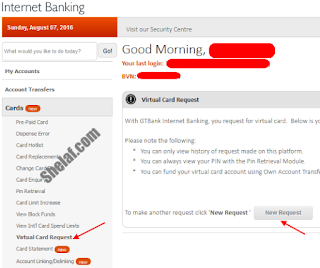
- Click on "Virtual Card Request
- Click on "New Request"
- Select the Account to Debit for charges
- Click on the ‘Account to link’ and agree to the "Terms and Condition" check boxes
- Answer your secret question and click the ‘Continue’ button
- The confirmation button is then displayed
- Generate a 6-digit code from your hardware token device
- Input the generated 6-digit token code on the confirmation page and click the Submit button
- Internet Banking will display the details of the Pre-paid card once your request is successful:
PAN (Card Number)
Expiry date
Activation Code
CVV
How To Transfer Fund To GTBank Virtual MasterCard Via Internet BankingYou must fund your GTB Virtual Master Card before you can use it to make online payments.
You can easily do this by making use of the "Own Account Transfer" module via "Account Transfer" but before you can do this, ensure that the virtual cards account number has been listed on your Internet banking dashboard, else you wont be able to fund it.
So, if the GTB virtual debit cards account number is not showing immediately you generate it, just exercise patient till it appears. You might have to wait till the next working day though.
Note: Creating the GTBank Virtual Pre-paid Card is not free. Certain amount will be deducted from your GTBank accounts and the most interesting part, you can convert your Virtual Card to a Physical MasterCard.
How to Convert to Your Virtual Pre-paid card to a Physical MasterCard
- In your dashboard, click ‘Convert to physical Card’ link button as shown on the right
- Select the Account to debit for the card Charge
- Select your preferred PickUp Branch
- Answer your secret question and click the ‘Continue’ button
- A record submitted succesfully is displayed once request is complete
Transaction Limit
- Maximum daily loadable limit: N100,000
- Daily Transaction limit (POS): N250,000.
- Maximum amount permitted on your card at any point in time: N250,000
Also Read;
» Now You Can Generate GTBank Token Code Via USSD To Complete Online Transcation
» GTBank Mobile Money For Blackberry, Apple, Android, Nokia & Full Touch
» 8 Things You Can Do With GTBank 737 Code
GTBank remain firm on their objective to deliver value adding services that are tailored to meet the diverse needs of their ever-growing customer base by leveraging technology to make banking more convenient for all their customers. Feel free to share your opinion about this new GTBank digital payment card.
Available link for download
Sunday, March 5, 2017
Now you can tap to pay in with Android Pay
Now you can tap to pay in with Android Pay
HI

The latest to join the list is Australia, and Google has listed an impressive number of supported banks — more than 25 including ANZ, Beyond Bank, and Macquarie. Unfortunately, ANZ is the only one out of the top four banks in Australia to support the payment service. To see the list of supported Australian banks,. One of the major banks, Westpac, said it would support Android Pay last year, so it’s unclear why it isn’t in Google’s list of banks. The search giant says more will be added soon, so we’ll have to wait and see if Westpac follows through.
But Aussies will also soon be able to use Android Pay within select apps such as Catch of the Day, Deliveroo, Domino’s, EatNow, Hotel Tonight, Kogan.com and more. That means speedier checkout times in apps as you won’t have to type out all your credit card information.
TAGS
android pay, android, google wallet, google, pay, samsung pay, apple pay, apple pay vs android pay, using android pay, android pay vs google wallet, android pay download, android pay install, android pay setup, android pay features, android pay review, android pay hands-on, google i/o 2015, using android pay store, android pay in action, android pay nfc, use android pay, android (operating system), other: nogreenscreen, gds: full production, type: live event, team: scalable advocacy, location: mtv, product: android, app, apps, markets, partners, features, pay as you go, developers, apple pay vs samsung pay, android pay fingerprint, android pay vs samsung pay, google pay, technobuffalo
Everything you need to know about Android Pay Now you can tap to pay in Australia with Android Pay
With Pay, you can start leaving your wallet behind, as anyone with a compatible device can pay for goods and services with a simple tap of their phone against a compatible point-of-sale terminal with near-field communication (NFC). Here’s everything you need to know about Android Pay, including the places and banks that support it.
Skip ?
Further International release plans
Android Pay isn’t available worldwide yet, but that’s changing in 2016. The U.K. became the first country outside the U.S. to support the mobile payment system in May, but others have followed since.The latest to join the list is Australia, and Google has listed an impressive number of supported banks — more than 25 including ANZ, Beyond Bank, and Macquarie. Unfortunately, ANZ is the only one out of the top four banks in Australia to support the payment service. To see the list of supported Australian banks,. One of the major banks, Westpac, said it would support Android Pay last year, so it’s unclear why it isn’t in Google’s list of banks. The search giant says more will be added soon, so we’ll have to wait and see if Westpac follows through.
But Aussies will also soon be able to use Android Pay within select apps such as Catch of the Day, Deliveroo, Domino’s, EatNow, Hotel Tonight, Kogan.com and more. That means speedier checkout times in apps as you won’t have to type out all your credit card information.
TAGS
android pay, android, google wallet, google, pay, samsung pay, apple pay, apple pay vs android pay, using android pay, android pay vs google wallet, android pay download, android pay install, android pay setup, android pay features, android pay review, android pay hands-on, google i/o 2015, using android pay store, android pay in action, android pay nfc, use android pay, android (operating system), other: nogreenscreen, gds: full production, type: live event, team: scalable advocacy, location: mtv, product: android, app, apps, markets, partners, features, pay as you go, developers, apple pay vs samsung pay, android pay fingerprint, android pay vs samsung pay, google pay, technobuffalo
Available link for download
Thursday, March 2, 2017
Amazing Things You Didn’t Know Whatsapp Could Do
Amazing Things You Didn’t Know Whatsapp Could Do
By Olatech at Gurufound
Do you know your WhatsApp messenger can do so much more beyond chatting? well here is five things you dont know your WhatsApp messenger could do
Do you know your WhatsApp messenger can do so much more beyond chatting? well here is five things you dont know your WhatsApp messenger could do
![[?IMG]](https://blogger.googleusercontent.com/img/proxy/AVvXsEjCfZuN-SSrmRREBZwqTbEJbZX-QQz4CP6idO0dgk1k1lGOnjdg9RRk87InsrwfOBVOOkg6EDZ57waVbUijqEqOxEkqeVI9S7K7ioK1-2UebfD4WbVGsagss9k_D2Js3Wc_79KE-33oUFExIs7KLAzUpUOX8aSX-TMjjcbfqsoTYpLYpGp5NzEIdsGz3Eu4AITQq_MwgMjy5dFemQ=)
Earlier this year, WhatsApp announced that it had a user base of more than one billion; that is, one in seven people on earth.
People all over the world have been using WhatsApp for numerous purposes. The popular messaging app, since then has added a host of new features with improved speed, security, reliability and simplicity. With such a huge user base, it is one of the most popular messaging apps.
WhatsApp has also just added a video-calling feature to the app after a series of beta tests. A rise in the app called Snapchat and its Stories feature, from Instagram to Facebook, and now even WhatsApp has tried to clone it. In the new WhatsApp’s Beta app on iOS and Android, there is a new ‘Status’ tab where the ‘Stories’ can be put and seen before it disappears 24 hours later. The new ‘Stories’ feature is only available to a select few who operate on a jailbroken Apple device or a rooted Android smartphone.
The messaging app just updated its messaging app on iOS and has made it possible for users to send and receive GIFs. Though a bit late to the game, it actually does a little more than just supporting animations. Users can send GIFs stored in the device memory as well as search Giphy’s large library and find animations to make your chats interesting.
All these new features to stay relevant in the ever-changing tech world have made WhatsApp even more popular. The company earlier announced that it manages over 100 million voice calls every day on the app, that makes it more than 1,100 calls per second. It has even upgraded the desktop versions of the app. Here are five latest features that you can try out in WhatsApp:
Video calling
WhatsApp just confirmed that it is rolling out the video calling feature across Android, iOS and Windows. You will now be able to see ‘Video Call’ and ‘Voice Call’ choices when you tap the top dialler button. A new dialog giving the option between a standard voice call and a video call will appear.
GIFs
The messaging app has rolled out support for GIFs support for iOS users with the latest version of the app. The 2.16.16 update allows you to send videos (six seconds or shorter) and Live Photos and GIFs. You can search the Giphy library to search for GIFs to send to your friends on your WhatsApp.
Tag
You can now tag others in the contacts within a WhatsApp group. You will be able to do the tag even if the people have muted the conversation. You can avail this feature by typing @ and click on the contact you wish to tag from the appearing list.
Picture edit
In the new update of WhatsApp, you can doodle on as well as edit on the photos before sending them to your friends. When the conversation tab is opened, you can tap on the camera button and click on the image from the camera. You will get a few icons on the top right, and you can choose to either crop the photo, draw a doodle, enter a text or a sticker to the photo. Then the picture message is ready to be sent.
Most viewed
There is an interesting feature in WhatsApp, although sadly it is only available to Apple devices as of now. Android owners may have to wait for a while. If you have iOS, you can go to ‘Settings’ and then select ‘Account’ and then ‘Storage Usage’. There, you will be able to see the total number of messages at the top of the page and also a list of chats, which are ranked according to the number of messages sent to the number. This helps you see who is your ‘best friend’, as in, to which contact have you spoken the maximum number of lines.
Available link for download
Monday, February 27, 2017
GOOGLE PIXEL WILL YOU CATCH A GOOD BIG BUG
GOOGLE PIXEL WILL YOU CATCH A GOOD BIG BUG
Google Pixel and Pixel XL are not yet available in France, and somewhere is much better. As the first Google house smartphones encounter many problems.After the audio and photo, a good new big bug touches the users. This time, the Google Pixel hangs and restarts completely randomly.

Google had certainly hoped for a better start to life for its Pixel and Pixel XL. The Mountain View firm has embarked on the adventure of the home smartphone, but unfortunately it has to face the many problems associated with creating its own smartphone.
Thus, since its launch the Google Pixel encounters many material problems. It all started with problems related to the photo sensor . At first, some users found that there was a halo problem arising during photo capture, under certain brightness conditions.
Then it was the audio part of Google Pixel that presented problems. They manifest themselves by a distortion of its sizeable when the volume was high. To date, Google has still not found a solution to these concerns related to audio and even recommended to go see elsewhere as it seems deprived in the face of the situation.
Alas for the firm, it is not finished. Because today a new very annoying bug has been echoed by several users. Called for the first time on 4 November, this concern translates into a complete blocking of the smartphone. The display is frozen and the smartphone restarts itself after 1 to 5 minutes in a totally random way.
Initially, Google said the problem should be related to the Life360 application and therefore advised users to delete it. But even after uninstalling it, the problem persisted. Worse still, those who had never installed this application were affected.
For now, the Mountain View firm has not spoken on the subject. Anyway, the beginnings of Google Pixel and Pixel XL are far from obvious. Lets hope for Google that the disaster stops here.
Available link for download
Friday, February 24, 2017
6 Things you need when you first buy a laptop
6 Things you need when you first buy a laptop
Make your computer last with gear guaranteed to keep it safe

¨
On the off chance that you just got your first portable PC, or possibly redesigning your old one, youll require more than only a case to keep it ensured.
Tablets arent modest, yet theyre a speculation since theyre more than only a PC. Theyre your on-interest motion picture theater, computerized photograph collection and the attendant of all your most loved playlists. Cloud or no cloud, supplanting one pulls on more than simply your wallet.
Since our PCs do basically everything for us, its nothing unexpected there are a lot of items out there to keep gadgets running easily. In any case, what do you really require? Utilize this rundown as a kind of perspective and your new tablet will be fit as a fiddle for whatever length of time that you have it.
1) Travel with your tech gear and never fear harm with a tough sleeve.
Shield your PC from drops and dings with a shockproof sleeve like this exceedingly appraised one by Evecase.
2) Protect your hard drive from overheating with a tablet cooling fan.
Why do accidents and stops dependably appear to happen even from a pessimistic standpoint conceivable time? Diminish potential debacles by decreasing the temperature of your portable PC.
3) Steer clear from scratches with a screen defender.
This hostile to glare, against scratch and against unique mark screen defender by CooSkin permits you to effectively see your screen regardless of the point of the sun. It likewise accompanies a six-month cash back guarantee, in the event that you alter your opinion.
4) Protect your gadget from awful volts with a surge defender.
Singed hardware are futile (and dont taste great either). The Belkin six-outlet surge defender has 200 joules of wellbeing to ensure your gadgets arent cooked amid the following tempest. Its a straightforward thing that will complete the employment securely.
5) Save yourself the anxiety of broken gadgets with a hard cover case.
Better to be as careful as possible, correct? Try not to fuss about scratches, in light of the fact that the Mosiso plastic shell case was outlined because of that. Presently you can securely carry your PC with you wherever you go.
6) Move faster with a remote mouse.
This current ones not a security need, but rather your issue free wrists will thank you later. Basically connect to a remote mouse, similar to this one from Logitech, and peruse the web or
play all your most loved computer games without hardly lifting a finger
TAGS
macbook pro, macbook air, new macbook, laptop, computer, 2015, which mac to buy 2015, notebook, personal computer (video game version), ninite, ccleaner, pc decrapifier, bloatware, new laptop, memory, processers, laptops, laptop_computers, computers_x_tablets, thingstoknow, deals, mobilestudio, apple laptop, mac, macbook comparison, macbook vs macbook pro, macbook vs air, macbook pro vs air, 2015 macbook, which macbook is best, which macbook to buy, mac buyers guide, new computer, which should i buy in 2015, which mac to buy, which mac should i buy, lightsaber, connected, futuristic, future
Available link for download
Subscribe to:
Posts (Atom)