Showing posts with label or. Show all posts
Showing posts with label or. Show all posts
Monday, March 6, 2017
You Can Use Your Android device As Second Monitor For Your PC Or MAC
You Can Use Your Android device As Second Monitor For Your PC Or MAC
Have you ever wondered what it would look like to Use your android device as second monitor to your PC? Maybe you actually thought its impossible? It is not and today I am going to guide you through on how to go about that. This will help you monitor some activity on your PC.

A computer consists of a single screen for display which is required for us to view all our activities we performed, primary users would not have the need to connect more monitor to their computer. An advanced technical task may require one to have an extra monitor been attached to your PC to manage the difficult task getting the monitor screens will be much expensive. In this post, we are going to show you how to use your Android as a second monitor to your PC or Mac which will reduce the cost of getting a monitor screen
Steps to Use an Android device as a Second Monitor for your PC
Required:
Android device
Your PC
iDisplay.apk(download)
iDisplay driver(download)
Your brain(download link not available... Lol)
- Download the iDisplay on Android device and also download the iDisplay driver on the computer. Double click on the iDisplay driver you downloaded follow the instruction.
- After following the above instruction, yo should have the driver installed automatically.
- Now restart your computer
- Check your system tray if the driver is installed or not.
- Click on the iDisplay installed on your tablet or Android device to launch, it will not require any settings from the beginning it will just searching for the computer WiFi signal. You are advised to turn on your Computer WiFi. Once the wifi signal is found by Android app, just go ahead and connect it to the options. You will get a pop-up message on the screen of your PC, just hit that away by clicking on Always Allow, hit the another warning too and you shall be ready for the process.
- After the above is done, you will find your connected Android device showing the same screen with your computer monitor.
- You can now set up settings for display resolution, color, etc. directly through the setup display of your Windows.
Disconnecting is just easy, do that from the iDisplay icon in the action center of the app!
I believe you can do a lot with this tutorial. share the post with friends on social media
Available link for download

How To easily Wipe All Data Remotely From Lost Or Stolen Laptop
How To easily Wipe All Data Remotely From Lost Or Stolen Laptop
Today, we will discuss on the latest security steps to follow in order to wipe a lost laptop remotely. In this era of advanced technology, everybody is got personal devices like laptop, mobile and tablets which are probably the only place where one stores his or her personal data and media files. Each significant account details and documents are stored in such devices.
_________________________________________________________
Read more:
How to bypass android pattern lock without losing data
15 best android launchers 2016
Top 10 best android soccer games 2016
___________________________________________________________
Therefore, the question that comes to your mind is what happens when the laptop gets lost?
What if it falls into the wrong hands?
When such happens, there is a great amount of danger when it gets to your privacy and you must find a way to wipe the laptop remotely so that you can secure the data and other kind of personal details and accounts which can get exposed easily. So, go ahead and check the complete guide on how to wipe a laptop remotely.How To Wipe Windows Laptop remotely?

When such happens, there is a great amount of danger when it gets to your privacy and you must find a way to wipe the laptop remotely so that you can secure the data and other kind of personal details and accounts which can get exposed easily. So, go ahead and check the complete guide on how to wipe a laptop remotely.How To Wipe Windows Laptop remotely?
In this article, you will come to know the standard step by step procedure on how to wipe your lost or stolen laptop remotely from your device. This would immediately work when your laptop gets connected to the Internet. So, just check out the below given steps to have a clear view on how to wipe a laptop data remotely.
Steps To Wipe A Laptop Data Remotely
1. First visit this website: theLaptopLock.com & Sign up with a email and password.
2. After login in, you need to add your computer name so your computer will get added in the account

3. First column is of Computer ID. Note it down, and download this software in your computer: thelaptoplock software
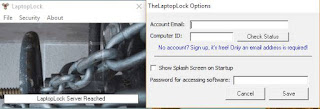
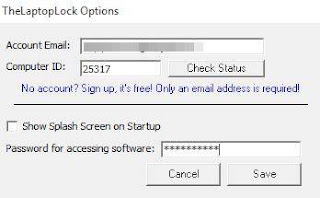
4. After installing the LaptopLock software in your computer, enter your email, computer id and password and click on save button
5. Now go to Security -> Manage Security Plans in the given dialogue box
6. You need to select file and folder that you wants to delete or wipe when your laptop is missing or stolen. It will also encrypt that files and folders at that same time.
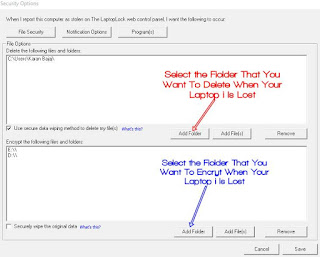
7. Now whenever your laptop gets stolen, you just need to login that website and just have to mark your laptop is missing.
8. Thats it. The selected folder will get deleted and it will be encrypted remotely.
The guide above is the full guide on how to easily wipe a laptop data remotely when it gets stolen. The above given steps would easily assist in wiping out the significant details which you don’t want unauthorized and wrong individuals to have access to, which could ultimately cost you a lot. So, go ahead and implement the remote wipe laptop method of securing the privacy. Share it with others and ensure that there is abundance of means and ways of protecting and securing data.
Available link for download
Friday, March 3, 2017
How To Resume Fix Failed Or Expired Download In Uc Browser
How To Resume Fix Failed Or Expired Download In Uc Browser
You will agree with me that it feels so annoying when
downloading your needed files from the internet using Uc Browser but unfortunately the network failed,
you tried to resume your downloading files which must have approached finished line
only for you to get expired error or failed error, hence refusing to resume and continue downloading.
STEPS TO FOLLOW
1. Open your file manager and go to UCDownloads folder.
2. Cut that file and .dltemp extension file of same name.
3. Paste them in any other folder.
4. Open UC Browser, hold that file and get details of that file, copy the file url.
5. Delete that file , open that url and download again.
6. Let it download upto 300 kb and then pause the download.
7. Exit UC Browser and open file manager, goto UCDownloads folder and delete that file with .dltemp file.
8. Cut the previous file with .dltemp file and paste it to UCDownloads folder.
9. Now open UC Browser and resume download.
10. Done, your failed or expired download will like it or not resume from where it
stopped with no file corruption.
downloading your needed files from the internet using Uc Browser but unfortunately the network failed,
you tried to resume your downloading files which must have approached finished line
only for you to get expired error or failed error, hence refusing to resume and continue downloading.
STEPS TO FOLLOW
1. Open your file manager and go to UCDownloads folder.
2. Cut that file and .dltemp extension file of same name.
3. Paste them in any other folder.
4. Open UC Browser, hold that file and get details of that file, copy the file url.
5. Delete that file , open that url and download again.
6. Let it download upto 300 kb and then pause the download.
7. Exit UC Browser and open file manager, goto UCDownloads folder and delete that file with .dltemp file.
8. Cut the previous file with .dltemp file and paste it to UCDownloads folder.
9. Now open UC Browser and resume download.
10. Done, your failed or expired download will like it or not resume from where it
stopped with no file corruption.
Available link for download
Thursday, January 26, 2017
Did the iOS10 update bricked your iPhone or iPad This is what to do a one time solution
Did the iOS10 update bricked your iPhone or iPad This is what to do a one time solution

On 13th September 2016, every one update its ipad and iPhone to iOS10. With the expectation of a better software experience but, turned out to be a brick medium to some iPhone and iPad... Sorry to those that fell victim .
This happened the that made use of over-the-air medium to update their iPhone and ipad, instead of automatically updating the device to iOS 10 via itune.

But there is a way, and the way is at legendtechny, we do our best to get your life worry free with our latest daily post that helps one in need.

How to unbrick your Bricked iPhone or iPad... Read below.
1. Connect your device(ipad or iPhone) to you PC or mac computer.
2. Open the iTunes on your PC or mac.
3.Press and hold the devices Sleep and Home buttons simultaneously(at the same time) until the recovery mode screen appears on your iPad or iPhone.
4. A command in iTunes will ask you to Update or Restore, click on update.
5. When the installation completes you should be able to make use of your phone again.
...If this problem persists, Apple suggests usingAppleCare.
How helpful is this? Share this post to others, your friends might need this information.
posted from Bloggeroid
Available link for download
4 must do things before buying a laptop or PC
4 must do things before buying a laptop or PC
Getting a Laptop have always been one of my life dreams till I got one 3yrs ago, there are some certain technique I adopted that made me get a better one for my self not minding that I dont have any technical knowledge of laptop or pc but unmade a good choice for my self and I can proudly say "I dont regret".

Read what to do before getting your self a laptop below.

1. Make some Web research about the product; thanks to the giant web search engines "Google", they have made it so possible that you will almost get the detail of what ever you at e searching for that have been in existence.

2. Check the Monitor; Now you have know every details of the laptop, I would like you to observe the inch of the laptop, check if it will fit to the work you want to use it for. Dont forget to also check on the graphic display of the system, this is one of the most import thing today check for a gaming laptop, as every display of the game is based on the graphic display quality.

3. Battery Life; this is the most important of all, check how log does the battery last before it goes down, the longer the Battery last the much you enjoy your Laptop, play game surf the web and read some PDF format books.

4. Finance; this is the first thing that is supposed to run to your mind before going for a laptop, it is good to know how much you have so that you dont make a budget that you cant solve. Now is not when without 100.000 thousand naira you wont get a laptop with just 50.000 thousand naira you can get your self a more than basic laptop that will serve your needs.
Now work straight to the market get your self a better laptop.
Read what to do before getting your self a laptop below.
1. Make some Web research about the product; thanks to the giant web search engines "Google", they have made it so possible that you will almost get the detail of what ever you at e searching for that have been in existence.
2. Check the Monitor; Now you have know every details of the laptop, I would like you to observe the inch of the laptop, check if it will fit to the work you want to use it for. Dont forget to also check on the graphic display of the system, this is one of the most import thing today check for a gaming laptop, as every display of the game is based on the graphic display quality.
3. Battery Life; this is the most important of all, check how log does the battery last before it goes down, the longer the Battery last the much you enjoy your Laptop, play game surf the web and read some PDF format books.
4. Finance; this is the first thing that is supposed to run to your mind before going for a laptop, it is good to know how much you have so that you dont make a budget that you cant solve. Now is not when without 100.000 thousand naira you wont get a laptop with just 50.000 thousand naira you can get your self a more than basic laptop that will serve your needs.
Now work straight to the market get your self a better laptop.
posted from Bloggeroid
Available link for download
Friday, January 20, 2017
How To Browse On The PC Or Laptop With Modem And Sim Card
How To Browse On The PC Or Laptop With Modem And Sim Card
This First Appear On Gurufound.

How To Browse On The PC Or Laptop With Modem And Sim Card
Hi Guys , Today I Want To Tell You How To Browse Through The Computer ,
To Browse With The Computer Is Simple
To browse with Computer You Will need somethings Like
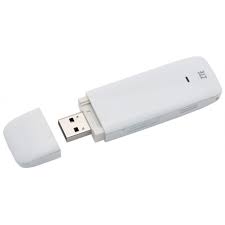
· A Modem
· Sim Card With Data
So After You Have Gotten The Modem And The Sim Card , You Will Insert The Sim Card inside The Modem And Then Insert On Your PC or Laptop
Yo Must Have Install The Modem Onto Your Computer System Before So After it Will Bring Some Thing like This below
Modem
Sim Card
So You Will Click Connet After You Clicked Connect You Will See It Will Bring Connected So Enjoy Browsing On PC Or Laptop
Pls Share This To Friends, Sharing Is Caring
Available link for download
Wednesday, January 18, 2017
Recover or Retrieve your Deleted Digital Camera Pictures or Photo
Recover or Retrieve your Deleted Digital Camera Pictures or Photo
Digital camera have helped human allot in keeping those remarkable moment, in a paper format, something that seems to last for ever if properly handled. One basic essence of a digital camera is to take pictures and store it for future viewing. Now to ask what happens if the picture you lost most was carelessly or accidentally deleted, ...how would you feel?
Many are buying a Digital camera today not minding the availability of camera phone with high mega pixel that seems to compete with the digital camera, but hey! good one, "digital camera always will have advantage over phone camera.
With this tutorial I will explain to how the digital camera works, I mean what I are the functioning parts that makes it possible to retrieve a deleted photo, and more to say, I will help you on how to retrieve a deleted picture from you digital camera with the help of some high quality and functioning apps. Each I will out list from the list and show you how to use it.
How does the Digital camera do its thing?
A digital camera stores all photos on a flash memory card which can be a SD, CF, Memory Stick, MMC card or other types.

Being made by different manufacturers(see p??? ics above),with different sizes and appearances, but are made for the same purpose– one very similar to a floppy disk or a hard drive.
When one select a photo he wants to delete, the digital camera locate the space allocated and mark that space as available for future usage.
The picture is not actually deleted until another image takes its place(similar to the bin of a PC). Basically, the photo is still there and it is very important to stop taking more pictures or the chances of recovering pictures that have been accidentally deleted will be reduced or lost.
Read more below*...
List of softwares that helps to retrieve a deleted photo from a Digital camera.
1. PhotoRec.
2. Asoftech photo recovery software.
3. EaseUS Card Recovery Wizard
4. soft ambulance photo undelete.
5. Card recovery software
6. Recurs
Read more; How to transfer contacts from Android to iPhone.

1.PhotoRec is a powerful photo recovery tool, it is capable to recover deleted picture from almost any device.
Developers claimed that this photo recovery tool can recognize and read about 390 different files. It also works with any memory disk; Hard disk, or USB stick that exists in the market. This app might not be liked by all, because this software runs in DOs box or from a command line, this might not appear so user friendly. This PhotoRec software is a surrogate software to test disk, so for one to get it one must install a Test Disk
To use this programe simply open the program, a menu will pop-up this will list all storage devices connected to your computer or PC, hard-drives, removable drives and mounted cards all will be shown. Choose the faulty memory stick and click on search parameters, an example “The Bruteforce” that recovers more fragmented JPEG files or “Low or less memory” on a crashed computer due to past recoveries.
Now make a choice of where you want to save all recovered pictures and wait, because everything else is automated. If it takes longer to retrieve photo, you have an option to quit the operations and to resume later.
The Windows version, PhotoRec is available on Linux and Mac OSX and can be downloaded for free from their official page.

2. Asoftech; This software specializes in recovering deleted, formatted or corrupted photos and videos from your digital camera.
All memory card types are supported including MMC, Memory Stick, CF Card, SDHC and many more file types.The interface is bright purple, easy to use and even allows a personalized or self configured search, limiting file types for better and quicker processes. But some users reports claime that the "software showed some problems in recovering movies in .mov format, but shows no negative result when recovering images as all was recoverd.
To undelete files, simply launch the program and choose the mounted memory card. After that, choose storage path, click “Start” and all recovered data will show up.
From the results page you can also choose photos or videos which you want to save on the personal computer.
The price, for me to say the price is a big disadvantage, not all can afford it at $29.95, because even if it’s so good you will have to pay $29.95 to really use it. The demo version will only find lost pictures and videos on a memory card, but does not display a save option. In demo version the file type usage is limited to 4 major file types: JPEG,BMP, GIF and PNG.

3. The EaseUSCard RecoveryWizard; which is a card recovery program it retrieves photos, videos and audio files from any flash memory cards, USB or SD cards used by cameras and phones.
Read More;How to add Random posts widget for Blogger with image thumbnails and excerpt
To make use of this software, connect the memory card to your computer(via USB or card reader), open the software which has two modes: Deleted File Recovery and Deep Scan.
The first is for recovering all deleted photos or videos from a memory card, while second is used to recover from damaged or inaccessible storage devices "that awesome".
When the scanning is over, you can choose which pictures or videos should be saved. A reliable and easy EaseUS Card Recovery Wizard can be purchased at a price of $39.95.

4. SoftAmbulance Photo Undelete;a powerful tool specialized in recovering and repairing deleted or corrupted photos / videos. It can restore images directly from a wide range of digital cameras, so you need not to pull out the memory card and use it through a card reader.
This application is also able to recover pictures and videos from hard disk drives, DVD’s, CD’s and Blue Ray disks. Formats like JPEG, TIFF, PNG, BMP and raw and other bunch of dozens of different file type. The programme have a very simple interface and light because this program has implemented an intuitive, easy-to-use wizard which guides users mostly first time users through all processes for the best result.
To use this programme, first select the desired device, click on the scan option and it will locate all deleted or corrupted photos and show previews of them, from this point you can choose which one should be saved.
If the memory stick is corrupted or damaged, SA Photo Undelete has a deep scan option, sector by sector, which will find any available pictures in little or no-time.The program also comes with a free evaluation copy which allows only previewing search results, while recovering deleted or damaged file costs $44.9.

5. CardRecovery; This is an application specially designed to recover files from a memory card used by digital cameras.
All main files and SD cards are supported on this software, from compact digital cameras (JPEG, PNG) used by common users to DSLR cameras (raw format) used by professionals. The three step wizard will guide you through a very simple process, to say more every thing is placed where it is supposed to be, not to mention the good interface that speaks for its self.
To use this softy simply input the location of the memory card, select the camera brand;this is optional and the location folder where the recovered pictures will be stored.
Read More;What do you Think of the Idea of Charging your Phone via Touchscreen
Now leave the rest for this software to do as everything else is automated, to browse through pictures you will have to wait until the whole process is finished. Developers made it known, that for an 8 GB SDHC card you will have to wait approximately 14 minutes to complete a full search. Picture(s) are displayed in thumbnail view, only for JPEG pictures, unfortunately it will display only six pictures on a page, this seems to be little bit discouraging when you are searching for a particular photo between hundreds of photos.
The Windows version, CardRecovery is also available for Mac OSX and can be tested before purchase.
Developers offer a free version which will scan memory sticks and find pictures, it cost $39 to get the pro version that have the save option button.

6. Recuva;In a situation whereby, you carelessly or mistakenly delete your photo(s) or video(s) from your Digital camera ,Recuva may represent a viable and possible solution. This program is developed by Piriform, Sam company made CCleaner optimization tool.
Nice interface and user-friendly juiced with a wizard that will guide you through the process of recovering pictures in a way on understands. It can make personalized searches for different file types, specific drives or enable a deep scan that will find pictures even on a damaged memory stick.
Read More;Spot a Samsung Galaxy phone that the bettery will explode.
Read the guide below for a successful operation
1. Launch the application and click “Next” on the “Welcome to the Recuva Wizard” page.
2. Now choose or select the type of files you want to recover.
3. Choose the location of the memory card from the “File Location” page and click
“Next”.
Read More;IPhone7 Pictures and Specification
4. Next page opportunes user to select a deep search option, which is preferred in the case of a corrupted memory stick.
5. Click “Next" and wait until the search or finding finishes. Click on the desired pictures to select and press “Recover” store them on your computer disk. After searching finishes, a list with the found pictures is shown coupled with their health and other detailed information.
Health refers to the fact that the picture was partly overwritten or not. Results can be also be displayed in thumbnail view to enable quick and smooth navigation between files.
Left behind the major 3 file types (JPEG, PNG,GIF) the program is capable to recover also Nikon RAW and Canon RAW (.CRW) formats, making it a number one choice even for pro consumers. One spectacular thing about Recuva is that it comes also in a free portable versionbso that in case you don’t have internet you can move it between the laptop and computer. The freebversion is fully-featured(have all feature) , while Pro and Business Editions cost$19.95 and $24.95 and they will only add support from developers.
Read More;How To Detect a safe Samsung Galaxy ...with non Exploding Battery
...and now how out tutorial hope it helped you out, in recovery you lost memory of good time.
posted from Bloggeroid
Available link for download
Monday, January 16, 2017
Its a Good Time To Buy a New Mouse or keyboard or both!
Its a Good Time To Buy a New Mouse or keyboard or both!
HI

Get Logitech PC gear pro 50 percent rancid, now single

Whether youre a gamer or moderate Internet user, you know having the aptly equipment is crucial. Just in justification you dont be inflicted with your marvel setup aptly currently, you might aspire to check made known Amazons one-day deal on Logitech products now, which are up to 50 percent rancid.
From mice to webcams, here are tons to point out from. Our favorite picks are the M570 wireless trackball mouse , which is a highly rated preeminent seller and single $20 now, and the Z523 lecturer logic with subwoofer, which is manifest down from $99.99 to $50. Quantities are restricted, so dont pass the time if you aspire something!
Shop the deal at this time.
dailydot
Tags
logitech, logitech driving force gt, logitech (business operation), review, wheel, g920, g29, unboxing, gear, shifter, project cars, racing video game (video game genre), racing game, playstation 4, battle, top 10 gaming keyboards, cooler master devastator, ec technology, redragon karura, azio l70 gaming keyboard, razer gaming keyboards, logitech g105 gaming keyboard, cheap gaming keyboards, best gaming keyboards, best gaming keyboards 2016, top 5 gaming keyboards 2015, nfs, intel i5 gtx 960, manual gears, need for speed gameplay, forza motorsport, assetto corsa, iracing, gran turismo (video game series), pc gaming, pc, arcade, xbox one, sim shifter, driving force shifter
Available link for download
Subscribe to:
Posts (Atom)