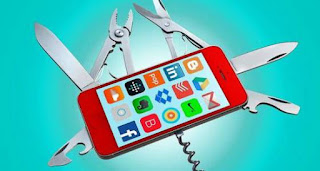
Nerds have all sorts of superpowers. The AC cranks up automatically when they pull into the driveway. They get an alert every time a decent vacation rental shows up on Craigslist. Their Instagrams magically post to Twitter.
You’d think any one of these tricks requires lines and lines of code. Nope. The secret is IFTTT, and you can master it in minutes.
Apps make life easier. But their popularity means walled-off internet experiences, rather than what we grew accustomed to with the open web. IFTTT, which stands for If This Then That, is a free service that makes apps and devices do things together. Think of IFTTT as duct tape, sticking together more than 300 services that don’t ordinarily get along: Apple Photos and Dropbox, Gmail and Evernote, Nest thermostats and Philips Hue bulbs, just to name a few.
The world is full of productivity tools, but the genius of IFTTT is its simplicity. It connects just two specific services at a time. You only need to imagine what’s possible when one thing can interact with another thing. These are called recipes, and they’re easy to make in a few taps on the IFTTT website or app.
Step 1: Choose a trigger, the “if this” part of the recipe. Triggers can be external events, like a time, a weather warning, a new tweet…even the arrival of photos from outer space. They can also be something you do, like going to a new location, taking a photo or tapping an IFTTT button on your phone or watch. (There are even physical buttons for the internet.)
Step 2: Choose an action, the “then that” part of the recipe. Actions can make something happen online, like sending an email or posting to Facebook —or in the physical world, like making your smart home lights turn on.
Step 3: Sit back and let your robot helpers do your bidding.
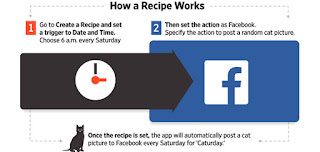
IFTTT is clearer after you’ve made a recipe, so let’s do one together. Download the IFTTT app or go to ifttt.com/recipes. Once registered, go to Create a Recipe, then set the trigger to Date and Time and choose 6 a.m. every Saturday. Then set the action as Facebook—you will be required to grant IFTTT access to your Facebook account. (You only have to do this once.) Then specify what you want the action to be: Post a random photo of a cat, for instance. Saturday is Caturday, after all.
This is a silly use for IFTTT, but there are endless serious ones that can really save your bacon. Around since 2010, it’s now used by more than 1.2 million people every day. I use IFTTT to warn me when the pollen index reaches take-a-Zyrtec levels, and to turn off my lights when I’m not home.
Journal readers I’ve heard from tell me IFTTT turns them into power users for services they love, be it Reddit, Instagram or an Automatic connected car. It can even streamline relationships: One reader, Carol Margolis, told me she uses IFTTT to automatically text her husband when it notices, via GPS, that she’s heading home.
The best part is that IFTTT has an avid community that shares recipes online—over 432,000 at last count—so we can all benefit from each other’s crazy concoctions. My contribution: I used IFTTT to turn my holiday lights red for a minute every time someone tweeted #ChristmasSpirit.
What can IFTTT do for you? Don’t let the possibilities overwhelm you. Here’s a place to start, with links to recipes you can try immediately.
Keep yourself informed
Lots of apps let you sign up for email alerts or notifications, but IFTTT brings more of them into the fold, and lets you manage them in one handy place.
Get a phone notification when it’s going to rain tomorrow.
Always see how your favorite team’s game ended.
Know whenever something you’re looking for gets posted to Craigslist, including an elusive apartment listing (use Advanced Settings to tailor your search).
Streamline your social media
IFTTT can automate some of the work of keeping on top of your social networks, so you seem like you’re everywhere.
Make your Instagrams post to Twitter as native photos rather than ugly links.
Save any Facebook photo you’re tagged in to Dropbox.
Auto-tweet your Happy New Year message, so you don’t actually have to stay up to watch the ball drop.
Make your gadgets work better
A little IFTTT ingenuity can improve the capabilities built into—or left out of—some devices. IFTTT is particularly useful with Android, which allows deeper controls than iOS.
Mute your Android phone when you arrive at work, so your colleagues don’t have to hear your ABBA ringtone.
Make Amazon Echo email your shopping list by asking Alexa “What’s on my shopping list?”
Scare a crook into returning your stolen phone after receiving a terrifying “call” from Liam Neeson. (Really.)
Smarten up your home
IFTTT can get you halfway to Austin Powers’s shagadelic pad by automating connected gadgets ranging from Nest thermostats to LittleBits building blocks.
Start brewing coffee when your Fitbit activity tracker notices you’re awake.
When someone rings the doorbell, make your lights blink.
When you’re near home, have your thermostat blast the AC.
Be a better you
IFTTT can take all the data in fitness trackers and other apps to nag—I mean, encourage—you to improve your habits.
If you don’t reach your Fitbit goals, punish yourself with an electric zap.
Or if you prefer the carrot: When you reach your Fitbit goal, text your spouse that you deserve a treat.
Pay yourself for finishing articles you’ve saved to read later in Pocket.
Now that you have IFTTT superpowers, you should know their limits. Granting IFTTT access to your apps doesn’t give the service your passwords, but it does allow your new helper to track you and make important (or embarrassing) things happen on your behalf. Definitely test your recipes before relying on them. I accidentally spammed Twitter followers for a few hours one evening when I misused a recipe.
Also choose a strong, unique password for IFTTT, and turn on its optional two-step login verification to keep hackers out.
The more you use IFTTT, the more your imagination starts to run wild—and into barriers. Recipes can sometimes take a few minutes to run, and IFTTT can’t easily perform complex, multistep programs or ones with extra conditions, like only running during certain times of day. If those are of interest, you should check out the more complicated $3 Workflow (for iOS only), which can tie together several apps into actions you activate with a tap.
IFTTT has dramatically increased the number of things you can connect since it made its debut in 2010. But it’s still missing popular apps such as WhatsApp, Uber, Airbnb and Sonos, and government data for things like restaurant health ratings. And it can’t do deep controls on iPhones and iPads (like automatically switching your phone to silent).
In fact, all IFTTT recipes work at the whim of the apps we want to connect. And they can take away access just as easily as they grant it. That happened in May with Instagram, which ended the ability to make triggers out of liking a photo or the arrival of a new photo under certain conditions. Not cool, guys! It spells the end of one of my favorite recipes: saving photos posted with a wedding hashtag to Dropbox.
IFTTT proves that the internet works better when we can make our apps and services play well together. How else would we get brilliant ideas like this: Stuck in a boring meeting? There’s an IFTTT recipe you can use to trigger an incoming call by discreetly tapping your phone screen, so you can hightail it out of there.
 Mr India is the worlds most desirable man after he beat out 46 finalists for the title of the worlds most desirable man.