Showing posts with label facebook. Show all posts
Showing posts with label facebook. Show all posts
Friday, March 10, 2017
Cara Membuka Banyak Account Dengan Satu Mozilla Facebook twitter gmail dll
Cara Membuka Banyak Account Dengan Satu Mozilla Facebook twitter gmail dll

Apakah bisa login beberapa akun di satu browser? Tentu saja bisa. Saya baru menemukan caranya di browser Mozilla. Kita bisa login sebanyak yang kita mau. Bagaimana caranya?
Tekan Windows key + R lalu ketik firefox -no-remote -P. Tekan Enter.
Tekan Windows key + R lalu ketik firefox -no-remote -P. Tekan Enter.

Klik Buat Profil.

Ketik nama user baru lalu klik Selesai.

Buat lagi bila diperlukan. Kalau sudah, klik Jalankan Firefox. Jangan lupa, hilangkan ceklis pada Jangan tanyakan saat memulai.

Bagaimana untuk bisa login dengan akun yang berbeda? Ketika kita menjalankan satu browser Mozilla, kita menjalankan satu profil sehingga kita tidak bisa login dengan akun yang berbeda pada satu profil. Begitu pula bila kita menjalankan kembali browser, otomatis akan membuka profil yang sebelumnya kita buat. Dengan cara ini pun, kita tidak bisa login dengan akun yang berbeda.

Lalu, bagaimana supaya kita bisa login dengan akun yang berbeda? Caranya, lakukan langkah yang pertama, yaitu membuka -no-remote -P lalu pilih akun yang berbeda.

Sekarang, kita bisa menggunakan akun yang berbeda dalam satu browser Mozilla.
Available link for download

Wednesday, March 8, 2017
Friendly for Facebook v1 2 12 Unlocked APK
Friendly for Facebook v1 2 12 Unlocked APK
 Description :
Make Your Facebook Great Again
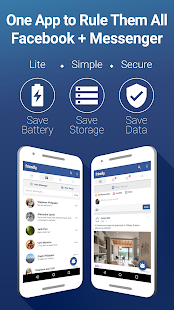
Friendly is the most complete Facebook and FB Messenger alternative. Built as an extension of the light Facebook mobile website, it will preserve your battery, storage and data, while giving you back control over your news feed.
Keyword Filters
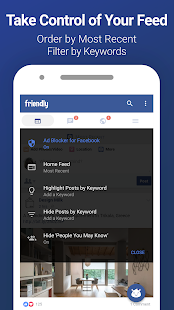
The brand spanking new Keyword Filtering feature for Android devices works in two ways: If you’re tired of seeing political posts, simply set your Keyword Filter to hide posts and articles containing the keywords “election,” “Republican,” or “Democrat”… and voilà: Any posts containing those words will not appear in your feed. Conversely, if you want to see more posts featuring cats (or posts from a close friend), you can set a Keyword Filter to highlight topics and users. Why settle for Facebook’s less-than-ideal algorithm when you can take full control with Friendly?
Key Features
•?Take control of your news feed with Keyword Filters.
•?Sort your feed by most recent posts.
•?Block Ads
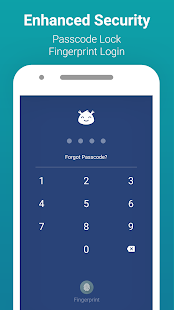
•?Secure your account with Fingerprint & Passcode Lock
•?Quickly switch between multiple FB accounts
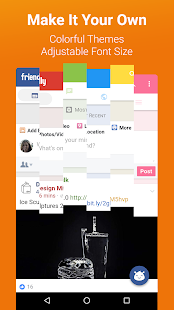
•?Beautiful material themes
•?Take control of your news feed with Keyword Filters.
•?Sort your feed by most recent posts.
•?Block Ads
•?Secure your account with Fingerprint & Passcode Lock
•?Quickly switch between multiple FB accounts
•?Beautiful material themes
Coming Soon
•?Friendly em Português
•?Friendly ????? ???
•?Night Mode
•?Opening Links in external browser
•?Friendly em Português
•?Friendly ????? ???
•?Night Mode
•?Opening Links in external browser
Instructions :
- Download & Install APK
- Enjoy

Screenshots :

How to download
- Open the link
- Wait 5 seconds
- Skip the ad
- Download apk in download page
Download Links:Friendly for Facebook v1.2.12 ModMirror #1
Sponsored Direct Links (High Speed)
App From: Fullstuff.co & SadeemApk.com
Available link for download
Saturday, March 4, 2017
How to use the Windows 10 Facebook app 2017
How to use the Windows 10 Facebook app 2017
HI

With 1.65 billion active users per month, Facebook is far and away the most popular social media platform on the planet – and its not hard to see why.
Its a breeze to stay up to date with family and friends wherever they are on almost any device. Now Windows 10 has joined the party with an app thats free to download from the Microsoft Store and run on your desktop.
While the arrival of a dedicated Facebook app for Windows 10 is new, Facebooks presence on your desktop is not. A previous version of the Facebook app was available for Windows 8.
However, this all-new version is slicker, quicker and more capable, making it easier than ever to stay up to date with what your friends and family are up to – and tell the world what youre about too.
So with that in mind, lets take a look at how you can make the most of it.
TAGS
windows 10, facebook, windows 8, windows 7, facebook app, windows 10 mobile, facebook (award-winning work), microsoft windows, tutorial, computer, how to, pc, windows help, official facebook, windows xp, windows, microsoft, winbeta, redstone, official facebook app, official facebook windows 10, new facebook, how to install facebook, windows vista, uwp facebook, facebook apps, windows app, windows 10 free, windows ported apps, ios ported apps, redstone features, windows 10 update, redstone build, 14367, new build, build 14367, new windows 10, windows 10 apps, computer repair, review
Available link for download
Sunday, February 26, 2017
How to permanently delete your Facebook accounts
How to permanently delete your Facebook accounts

...being asked of this question by so many people, "how can I delete my Facebook account Stanley" I never want to make any post of this nature, because I see no reason for some one willing to delete his Facebook account, due to the numerous questions I sat and though then with the little answers I got, so I decided to write this article you are reading now, because it seems relevant to who that is I need of it.
There are some things of life man gets tired of, and want to dispose, for a reason you might like to permanently delete your Facebook book account may be it is having a bad impact in your life, thing like not concentrating in your studies, due to numerous message notification at all time, or you are doing it to keep your ID secret and safe, may be you are spending a lot in it, or may be you arent satisfied with what you are getting out of it and feels like deleting your Facebook account.
...how to delete a Facebook account.

1. Login to you Facebook account

2. Go to the Facebook general account setting, and click on Download Copy. To back up your account details.

3.Click the “down arrow" in the upper right hand corner, click on the account settings, select security on the left menu, then click deactivate your account.

4. Click on the key icon on the upper right-hand corner and click on the "magnifying glass." and type delete in the search box.

5. Navigate to the question, "how do I permanently delete my account, click on it and scroll down to "let us know." click on delete my account, put down password and submit captcha.
Note; ones you click on the delete button, your account wont disappear immediately. A period of 14 days must pass by before your account deletion is complete.
Although you can delete some information like, pictures, sent and received test messages using the activity log option.
...To access the Activity Log, click the "Privacy button" in the top right corner (it looks like a padlock next to three horizontal lines). Click “See More Settings”. On the next page, click the"Use Activity Log" link. Here, you can delete any of your preferred activity, just by clicking the small pencil icon next to each and selecting "Delete".
That is it all, you have seccesfully deleted your account.
Delete your facebook account via Email.
You can email at private@facebook.com from your registered email id for Account delete request.
What is the difference of CAPTCHA & password ?.
Captcha is a robot texting texts or image, sometimes it might be in the option of you putting down your number and you will be called and be given a special code to input in the Captcha box that can grant you access.
...see image of Captcha below.

While password is numbers or alphabets, either formulated by you, or generated by password generator, that proves ownership to an online account, and grants for access to it.
Read More Below...how to create a Facebook account
1. Open your browser and input this URL www.facebook.com/signup in the URL space, or click HERE to open the sign up page.
2. Fill the blank boxes with the appropriate information needed.
3.Click the sign up "Button"
4. Confirm your account using the medium(Phone number or Email) for verifying your account, provided by you.
posted from Bloggeroid
Available link for download
Tuesday, February 21, 2017
Facebook Launches Video Group Chat For Messenger App
Facebook Launches Video Group Chat For Messenger App
By Olatech at Gurufound
Facebook has always been in the culture of regularly releasing new features and improvements to their messenger app. Recently, Facebook added a camera feature to messenger app which lets you easily take pictures and record videos to share among your friends.

Now Facebook has just added a Snapchat like feature which lets you create a video group chat with up to 6 people at the same time. Unlike the voice group chat which allows up to 50 members, the video group chat allows just 6 people at the same time.
Using the new messenger video group chat is very easy. First you need to open an existing messenger group conversation or you can go ahead and create a new one, click on the video icon which can be found at the top right corner of the screen to start a video chat. After that, everyone in the group conversation which get a notification that a video chat session is ongoing.
Everyone in the group can join the conversation just with a single click.
Although only a maximum of 6 people can see can see each other, more than 6 people can actually join the conversation.
After the first 6 members, the next 50 people will be a able to join the conversation through a voice chat or by just listening.
This new feature is already rolling out to both android and iOS users, and all to all regions. Although its not available for desktop users yet, but it will be available soon.
Facebook has always been in the culture of regularly releasing new features and improvements to their messenger app. Recently, Facebook added a camera feature to messenger app which lets you easily take pictures and record videos to share among your friends.
Now Facebook has just added a Snapchat like feature which lets you create a video group chat with up to 6 people at the same time. Unlike the voice group chat which allows up to 50 members, the video group chat allows just 6 people at the same time.
Using the new messenger video group chat is very easy. First you need to open an existing messenger group conversation or you can go ahead and create a new one, click on the video icon which can be found at the top right corner of the screen to start a video chat. After that, everyone in the group conversation which get a notification that a video chat session is ongoing.
Everyone in the group can join the conversation just with a single click.
Although only a maximum of 6 people can see can see each other, more than 6 people can actually join the conversation.
After the first 6 members, the next 50 people will be a able to join the conversation through a voice chat or by just listening.
This new feature is already rolling out to both android and iOS users, and all to all regions. Although its not available for desktop users yet, but it will be available soon.
Available link for download
Monday, February 20, 2017
Autopost Facebook Group Via iMacros Free
Autopost Facebook Group Via iMacros Free
utopost To All Facebook Group With Imacros , Delay bisa diatur sesuka hati.
Script hanya bisa menampilkan teks saja , link juga bisa hanya akan jadi link hidup tanpa (preview).
Script ini dijalankan lewat facebook mobile yaitu m.facebook.com , harap login terlebih dahulu sebelum menggunakan script ini ..
Download Script : Autopost Text Facebook Group.iim
Download File Post : IsiPost.csv
Setelah di download jangan lupa pindahkan file Autopost Text Facebook Group.iim ke folder Macros dan file IsiPost.csv ke folder Datasources
Autopost perlu list grup dan file grup .htm, jadi untuk mengambil list grupnya buka link ini https://m.facebook.com/groups/?seemore
Setelah link terbuka, klik kanan dimana saja , lalu pilih Save Page As...

Ubah namanya jadi AllGrup , Save as type pilih seperti gambar di bawah ini

Hapus 7 baris pertama dan 10 baris terakhir


 Save File ke folder Datasources Imacros dengan nama List_Grup.csv


Selanjutnya Edit dulu file imacrosnya, cari "LINK FILE ALLGRUP.htm" (tanpa tanda kutip) , tekan F3 atau CTRL+F agar lebih mudah , jika sudah ketemu ganti dengan link yang telah di copy tadi


Script hanya bisa menampilkan teks saja , link juga bisa hanya akan jadi link hidup tanpa (preview).
Script ini dijalankan lewat facebook mobile yaitu m.facebook.com , harap login terlebih dahulu sebelum menggunakan script ini ..
Download Script : Autopost Text Facebook Group.iim
Download File Post : IsiPost.csv
Setelah di download jangan lupa pindahkan file Autopost Text Facebook Group.iim ke folder Macros dan file IsiPost.csv ke folder Datasources
Autopost perlu list grup dan file grup .htm, jadi untuk mengambil list grupnya buka link ini https://m.facebook.com/groups/?seemore
Setelah link terbuka, klik kanan dimana saja , lalu pilih Save Page As...
Kembali lagi ke Grup tadi , tekan CTRL + A , lalu Copy

Buka Notepad , Klik kanan lalu Paste

Hapus 7 baris pertama dan 10 baris terakhir
Klik di teks terakhir untuk mengetahui jumlah grup
Jika ada error seperti ini, Tekan OK saja
Jangan lupa angka angkanya harus di hapus jika tidak script tidak akan bisa jalan , cara cepatnya gunakan Notepad++ , buka file dengan notepad++ , tekan CTRL+F , pindah ke tab Replace
Isi kolom Find What dengan angka 0 dan Replace With dengan spasi , lalu klik Replace All , ganti nomer sampai angka 9, jika sudah Save lagi file tersebut
Belum selesai, sekarang buka dulu file AllGrup.htm dengan browser kalian dan copy linknya

Selanjutnya Edit dulu file imacrosnya, cari "LINK FILE ALLGRUP.htm" (tanpa tanda kutip) , tekan F3 atau CTRL+F agar lebih mudah , jika sudah ketemu ganti dengan link yang telah di copy tadi
Kemudian Save & Close
Untuk mengganti isi post, silahkan edit File IsiPost.csv yang ada di folder Datasources Imacros tadi. Paragraf Baru ganti dengan <BR> jangan gunakan tanda koma , Oh iya untuk delaynya (jarak postingannya) tinggal ganti angka 30 yang ada di dalam file IsiPost.csv tadi sesuka hati, jangan hapus tanda koma yang telah ada .

Jika ada masalah silahkan berkomentar di bawah.
Tag : autopost, facebook, group, imacros
sumber : iMacros ID
Available link for download
Wednesday, February 15, 2017
How to automatically share your blog posts to Facebook group when published
How to automatically share your blog posts to Facebook group when published
A lot of bloggers are using Facebook groups to drive massive traffic to their blogs. They create Facebook groups, add thousands of members, then auto post to the Facebook groups from their blogs.
Read more »Available link for download
Saturday, February 11, 2017
How to Add Facebook Like Popup Box Widget in Blogger
How to Add Facebook Like Popup Box Widget in Blogger
Facebook is the best way to
get traffic to your website or blog. Most of you might be wondering how to increase the likes of fb page and thereby organic reach to your page. Here is one method through which you can easily increase your
Read more »get traffic to your website or blog. Most of you might be wondering how to increase the likes of fb page and thereby organic reach to your page. Here is one method through which you can easily increase your
Available link for download
Saturday, February 4, 2017
Add floating Facebook like widget to blogger and get many likes
Add floating Facebook like widget to blogger and get many likes
Hello! I know you must have been searching for a way to get more likes on your facebook page, probably a way that really works, well I also was until I stumbled upon this awesome trick that shows floating Facebook page like box on your blog and
Read more »Available link for download
download facebook messenger for android apk free 2014
download facebook messenger for android apk free 2014
Download Facebook messenger for android apk free 2014 .Download . Facebook , messenger , for .android . apk . free . 2013
download facebook messenger for mobile free
download facebook messenger for android free
download facebook messenger for mobile free
download facebook messenger for android free
Download Facebook Messenger for Android for free. Download Facebook Messenger for Android direct link for free. Download Facebook Chat for Mobile Arab Samsung. Download Facebook Chat for Mobile Conexant. Facebook Chat program for the Galaxy a direct link for free. Facebook Chat program for Android latest version. Facebook Chat program for the new Android. Program Facebook Chat for Android new version
Download Facebook messenger for android apk free
Available link for download
How To Add Facebook Twitter Google Plus Whatsapp Social Media Share Button On Blogger Mobile View
How To Add Facebook Twitter Google Plus Whatsapp Social Media Share Button On Blogger Mobile View
Most of us have seen share button on their blogger desktop version but still wonders why it doesn't display on their blogger mobile template.well, this is because the
Read more »Available link for download
Monday, January 23, 2017
Fast to use Facebook Chat without messenger board
Fast to use Facebook Chat without messenger board

Hello friends, Today I tell you a trick for Facebook Chat Without Messenger. Yes! Now you can chat on Facebook with friends and family without using Facebook Messenger. You can chat with all your Facebook friends directly without a Facebook application and even without messenger download.
Facebook is one of the most commonly used applications on the mobile phone. These days the Facebook application increases in size every month. Previously, Facebook consumes 20MB on disk and 5MB of RAM. But today, Facebook takes up much of your phone memory and RAM. Currently, the Facebook application takes storage of 200MB and 150MB 100 of your RAM. In this scenario, the smartphone stops working and hangs. Well, if you are facing the same problem. Then follow the steps below and use facebook without messenger download.
I will share an app below. You need to download the Modded Facebook application on your smartphone. This application consumes much less disk space and reduces RAM consumption by more than 70%.
Requirements:
The Android version should be more than 2.3.
You must completely remove the Facebook app on your Android phone.
Make sure that even if you have removed all sorts of hidden files from your disk space.
Use Facebook Chat Without Messenger:
Download Facebook Modded App
Download chat Enabler
Note: Modded Facebook App is in the .apk file. Visit Settings => Security => Allow applications to download from unknown sources.
Now download and install the Modded Facebook application on your Android device.
Now, sign in to your Facebook account.
Do not worry, it is totally safe. This app is safe and does not store your personal information. If your Android version 6.0 Marshmallow. So will fail and create a problem for yours. Do not worry, because you can easily eliminate this error.
Open your Android phone settings.
Now press the applications.
Then, scroll down and press Facebook.
Now, press the permission and allow any permission.

Available link for download
Subscribe to:
Posts (Atom)