Showing posts with label ip. Show all posts
Showing posts with label ip. Show all posts
Wednesday, March 8, 2017
IP BOX V2 Ver 3 9C Setup Download
IP BOX V2 Ver 3 9C Setup Download
IP BOX V2 New update Ver 3.9C come!!!
 1?Add Advanced Option for repair Boot,You can press F2 for run it
2?Support Double Boot Auto Distinguish
3?Read SPI Flash auto show you imei
4?WIFI/BT add auto creat?
5?New update Change SN only function ,auto Creat Wifi and BT add,Support all the model
6?if SN has Illegal character, the Tips you for fix it
7?Add new flash support SDMBLBCF4_064G?
8?adjust iPhone5s,now all the 5s change disk,Fingerprint function available
Click Download Last Update Ver 3.9c
Available link for download

Sunday, March 5, 2017
Netify Vpn Settings For Mtn Bblite Etisalat Magic ip Musicplus
Netify Vpn Settings For Mtn Bblite Etisalat Magic ip Musicplus
The New Boss in Towm - Netify VPN apk HERE
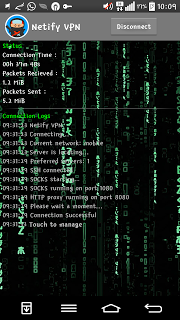
Netify Vpn Settings For Mtn Bblite
1. Download Netify Vpn from the link above and Install it
2. Netify Vpn Settings, Tick Remove Port
Proxy Type: Use Dual Real Host or Real Host, Both of them works.
For Daily sub dial this code *216*3*1# @ N70
For Weekly sub dial this code *216*3*2# @ N350
For Monthly sub dial this code *216*3*3# @ N1000
All of them are capped 5gb respectively.
APN SETTING
APN: web.gprs.mtnnigeria.net
APN Type: default
Proxy: 127.0.0.1
Port: 8080
authentication: pap
save it
Also u can use MTN Default Settings
APN: web.gprs.mtnnigeria.net
APN Type: default
Proxy: leave it black
Port: leave it black
user name:web
password:web
authentication: pap
save itFor mtn Bblited, Use…..
ping.blackberry.com or web.blackberry.com or appworld.blackberry.com or rim.blackberry.com

3. In the More Handler Settings
Tick Connect Through a Http proxy
Tick Use the Following Settings
Tick Connect Through a Http proxy
Tick Use the Following Settings
Host Address: 10.199.212.2
Port: 8080

Click back to Save, On your data and
Enjoy the speed. No Diff it same way u configure ur psiphon app or Syponshield.
NOTE
If the speed becomes slow, off your data and on it again or u activate and deactivate flight mode
For MTN MUSIC PLUS USERS
NOTE: after d above netify VPN Settings, so instead of ping.blackberry.com replace it with this musicplus.mtnonline.com
Mode 2
==> Send music to 5900, you will be given 150mb if youve not activate it b4.
==> Once you have exhausted the mb send D to 5900 again for another 150mb
==> once you finish the second free 150mb send i to 5900 for another free 150mb.
Check your balance again when they reply you. That is how you can keep on renewing the 150MB over and over
FOR MORE TIPS ON NETITY VPN FREE BROWSING CLICK HERE
For Etisalat Users
Etisalat Settings
Etisalat Settings
APN: etisalat
APN Type: default
Proxy: leave it black
Port: leave it black
authentication: pap
save it
Open your Netify vpn and configure it like this;
- Launch your Netity vpn
- Select Reverse Host and
- In proxy server input instagram.com or Twitter.com or Skype.com
- In real proxy type select inject
- Leave others as it is and click save
- Click option and more options
- Tick connect through Http Proxy
- Tick use t the following settings
- Input any of these ips below
Etisalat N0.0k magic ip
192.99.54.110:8080
192.88.54.110:3128
Takes 10-15mins to connect
Faster way of connecting etisalat N0.0k magic ip
Front query input Twitter.com%3a%2f@
Proxy type select reverse proxy
Proxy server input Twitter.com
Real Proxy type select inject
Real proxy server input Twitter.com
Port 80.
Click save and you can the above ips or this new one 5.189.175.170 and port 3128
192.99.54.110:8080
192.88.54.110:3128
Takes 10-15mins to connect
Faster way of connecting etisalat N0.0k magic ip
Front query input Twitter.com%3a%2f@
Proxy type select reverse proxy
Proxy server input Twitter.com
Real Proxy type select inject
Real proxy server input Twitter.com
Port 80.
Click save and you can the above ips or this new one 5.189.175.170 and port 3128
Available link for download
Monday, February 6, 2017
Airtel 0 0k free browsing IP address Airtellive ng IP address
Airtel 0 0k free browsing IP address Airtellive ng IP address
This First Appear On Gurufound.
Is your airtel 0.0k free browsing is slow in connecting or slow in downloading, or disconnect anyhow?
If yes then here are few supper working IP address you can use for your Airtel 0.0k unlimited free browsing to get good downloading and, improve the speed at which your VPN connects, and also stop disconnection issues.

All you have to do is pick any of the below IP address and tweak it in your psiphon A+ pro, Xp psiphon, Netify VPN etc.
Airtel 0.0k Free browsing IP address |Airtellive.ng ip address
? 54.201.138.63 8083
? 45.40.143.57 80
? 70.248.28.23 800
? 97.77.104.22 3128
? 159.203.175.175 8080
? 40.84.24.155 80
? 207.242.206.154 3128
? 173.191.224.28 8080
? 47.89.41.164 80
? 108.166.171.198 80
? 35.164.66.67 80
? 54.183.70.60 8083
? 50.93.197.98 1080
? 47.88.11.13 8080
Reasons why Airtel 0.0k free browsing disconnect and slow
•• Because of large number of people using same IP address.
•• Lack of strong 3g network tip: set your network to 3g only to avoid disconnection.
With the above Airtel IP Addressyou can now browse, download, stream videos without constant disconnection anymore.
Happy Free Browsing
Is your airtel 0.0k free browsing is slow in connecting or slow in downloading, or disconnect anyhow?
If yes then here are few supper working IP address you can use for your Airtel 0.0k unlimited free browsing to get good downloading and, improve the speed at which your VPN connects, and also stop disconnection issues.
All you have to do is pick any of the below IP address and tweak it in your psiphon A+ pro, Xp psiphon, Netify VPN etc.
Airtel 0.0k Free browsing IP address |Airtellive.ng ip address
? 54.201.138.63 8083
? 45.40.143.57 80
? 70.248.28.23 800
? 97.77.104.22 3128
? 159.203.175.175 8080
? 40.84.24.155 80
? 207.242.206.154 3128
? 173.191.224.28 8080
? 47.89.41.164 80
? 108.166.171.198 80
? 35.164.66.67 80
? 54.183.70.60 8083
? 50.93.197.98 1080
? 47.88.11.13 8080
Reasons why Airtel 0.0k free browsing disconnect and slow
•• Because of large number of people using same IP address.
•• Lack of strong 3g network tip: set your network to 3g only to avoid disconnection.
With the above Airtel IP Addressyou can now browse, download, stream videos without constant disconnection anymore.
Happy Free Browsing
Available link for download
Subscribe to:
Posts (Atom)